Introduction
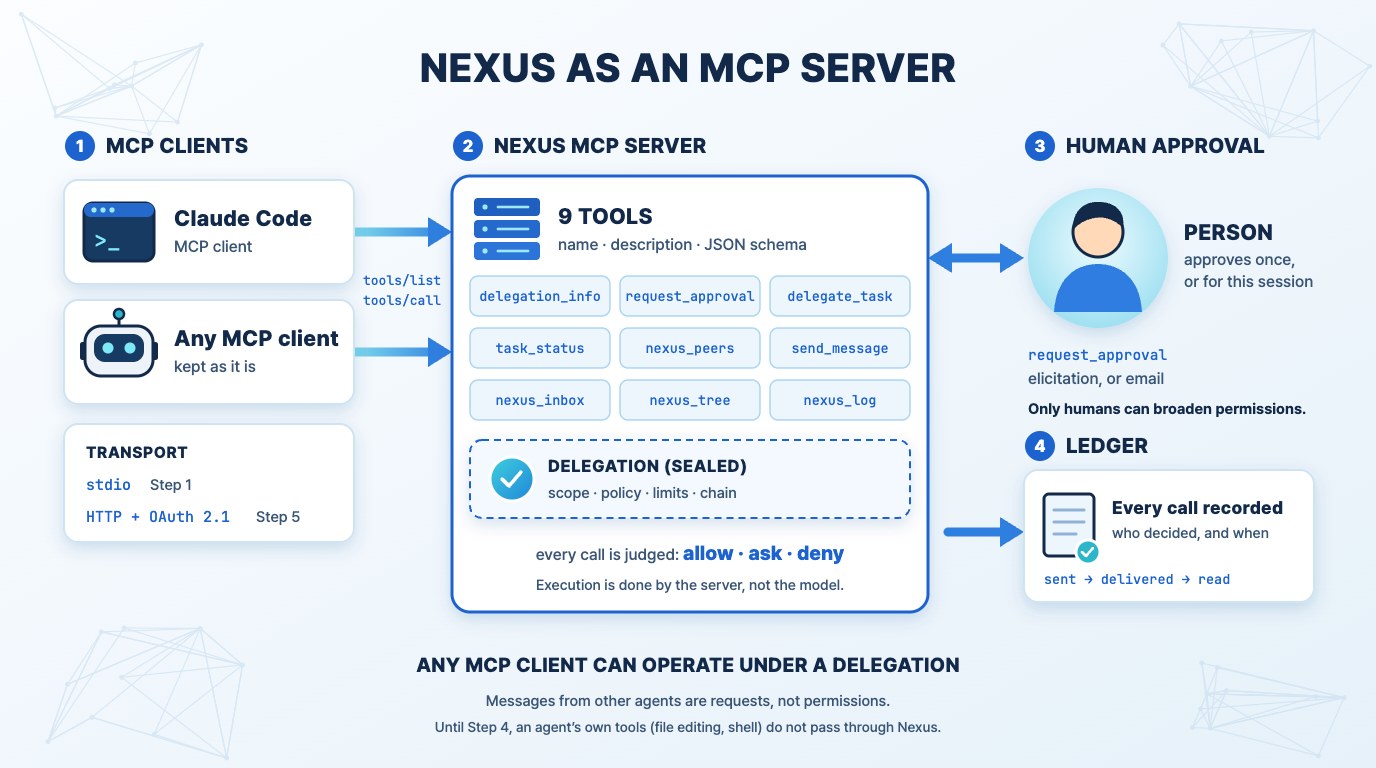
The conclusion of the previous article was that "NMCP is an extension of MCP." This article covers the first step in that direction: how to expose Nexus's tools as an MCP server, allowing any MCP client to operate under a delegation.
Currently, Nexus's tools are only integrated with our agent engine. For other agents to join a team, they must run on our engine. Exposing them as an MCP server removes this constraint. Agents already in use can be kept as they are and brought into the team.
Pre-established Principles
Before dividing into steps, we list what will not change at any step.
- Execution is done by the server, not the model. Even if the model misinterprets the delegation, the server will reject it. Showing the delegation to the model is to reduce wasted effort and enable explainability.
- The content of the delegation is not included in the prompt. The delegation is transmitted sealed, and the model reads only the necessary items when it calls a tool.
- Only humans can broaden permissions. Neither the agent itself nor messages from other agents can broaden permissions.
- Messages from other agents are requests, not permissions. The recipient only assists within its own delegation.
- "Read" means the moment it enters the model's input. Having fetched it or displayed it on screen is not considered read.
The MCP specification also states, "Do not trust tool descriptions and comments unless they come from a trusted server." The same principle applies to Nexus tools. Descriptions are guidance, and judgment is made by the server.
Tools to be Released
Nexus's tools are already defined in the same format as MCP tools (name, description, JSON schema). Therefore, the migration itself is not difficult.
| Tool | Function |
|---|---|
delegation_info |
Reads its own delegation (delegator, task, scope, policy summary, remaining limit, expiration). Can also query if a specific action is allowed. |
request_approval |
Requests human approval for actions not in the delegation or required by policy. |
delegate_task |
Delegates a sub-task to another agent. Scope and limits are less than or equal to its own. |
task_status |
Views or waits for the status and results of a delegated task. |
nexus_peers |
Views agents in the same account and their current tasks. |
send_message |
Writes to another agent. Notifications not expecting a reply are marked as such. |
nexus_inbox |
Reads messages received by itself. |
nexus_tree / nexus_log |
Reads the progress and ledger of the task tree. |
Step 0 — Fix the contract in one place
First, we fix the tool's name, input schema, result and error formats, and conformance tests in one document and one set of tests.
- Reason: The same tool will be exposed through two paths: our engine and the MCP server. If the behavior of the two paths diverges, the meaning of delegation will be undermined.
- Deliverables: Tool contract document, and conformance tests that verify rules such as "actions outside delegation are rejected" and "sub-agents cannot increase permissions," regardless of repository type.
- Completion Criteria: Both the engine path and the MCP path pass the same tests.
Step 1 — stdio MCP server
We start with the simplest form: an agent launching an MCP server as a sub-process on its own device.
- The moment the server starts, a session for that agent is created in Nexus (with a specified name), and a delegation is issued to that session.
tools/listreturns the tools above, andtools/callinvokes the same tools in Nexus.- All calls are recorded in that session's ledger.
- Credentials are obtained from the environment as per MCP specifications (stdio transport does not use OAuth flow).
- The delegation is sealed and only unsealed within the server process. The model reads it only via
delegation_info.
Completion Criteria: An external MCP client views a list of peers, sends a message, and receives a reply. All calls are recorded in the ledger. Requests for actions not in the delegation are rejected and lead to an approval request.
Step 2 — Path to receive messages
Here, the structure of MCP becomes a challenge. MCP operates on a client-query, server-reply model, so the server cannot push messages to the model. In our engine, when a message arrived, it was inserted mid-turn, or if the agent was idle, it initiated a turn itself. This is not possible with an MCP client.
We will attempt three approaches in order:
- Waiting Inbox. Allow
nexus_inboxto specify a waiting time. When the agent has nothing to do, it waits for the next message using this tool. - Tasks Extension. MCP's Tasks extension handles long-running operations with polling and persistent handles. We will explore if waiting for replies or approvals can be integrated here.
- Host Hooks. If the host supports hooks or notifications, we will enable it to wake up the agent when a message arrives. This is optional as it varies by host.
The definition of "read" remains the same. A message is recorded as read only at the moment it enters the model as a tool result.
Completion Criteria: The status of a message sent to an external agent (sent → delivered → read) is accurately displayed on the sender's side. Messages received while the agent is idle are read without human intervention (to the extent allowed by the host).
Step 3 — Human Approval
request_approval currently goes to a human via email. MCP has "elicitation," where the server asks the user for additional information.
- If the human is present, elicitation is used to ask. It shows what, why, and to what extent is being permitted.
- If not present, it goes via email as before.
- Regardless of the path, the decision is recorded in the ledger and distinguishes between "once" and "for this session."
Completion Criteria: The same approval request is decided through one of the two paths, and the person and time of decision are recorded in the ledger. There is no way for the agent to approve itself.
Step 4 — Including the agent's own tools
Let's clarify the limitations of Steps 1-3. Nexus cannot block tools originally possessed by external agents (e.g., file editing, shell execution). This is because those tools do not pass through Nexus. Until this step, external agents are at the level of "participating in the team and reporting," not "controlled by delegation."
To control them, the agent's runtime must query Nexus before executing a tool.
- Runtime Hooks: In runtimes that support pre-tool execution hooks, the hook receives Nexus's judgment and follows allow, ask, or deny.
- Gateway: Place the external MCP server used by the agent behind Nexus. The agent calls those tools through Nexus, and Nexus judges each call before passing it on. This connects to direction #2 in the previous article.
- Runtimes that cannot use either hooks or a gateway are marked as "participation only." We do not claim control over what is not controlled.
Completion Criteria: In a runtime with hooks, tool calls not in the delegation are blocked before execution, and this fact is recorded in the ledger.
Step 5 — HTTP Transport and Standard Authentication
This is the step of exposing to a remote server, not a sub-process within the device. Here, we strictly follow the MCP's authentication standard.
- Nexus becomes the resource server for OAuth 2.1. It exposes protected resource metadata and verifies that the token was issued for this server.
- It does not receive or pass tokens for other servers (this is also a requirement of the MCP standard).
- Tokens and delegations have different roles. A token answers "Can I access this server?", and a delegation answers "How far can I go in this task?". After verifying the session with a token, the call is judged by the delegation of that session.
- The closest standard for expressing "who is acting on behalf of whom" as a chain is the
actclaim in OAuth Token Exchange (RFC 8693). We are considering following this format when carrying the delegation chain in the token.
Completion Criteria: A standard MCP client completes the authentication flow and uses the tool without additional configuration. Tokens for incorrect targets are rejected.
Step 6 — Publish the Specification
Finally, we publish the following as public documents:
- Delegation format (scope, policy, limits, chain, expiration, seal)
- Judgment rules (follow the strictest answer in the chain, reject actions not mentioned by any link)
- Ledger event types and order guarantee
- Tool schema and error format
MCP optionally accepts extensions. The goal is to organize the delegation hierarchy as an extension proposal that fits that framework.
Pre-noted Limitations
- Scope of Enforcement. Until Step 4, Nexus cannot prevent external agents from using their own tools.
- Model Budget. Model calls from external agents do not go through Nexus's gateway, so they are not counted towards token limits. Limits that go through Nexus, such as how many sub-tasks can be delegated, still apply.
- Injection. Instructions mixed in tool results and messages from other agents are still dangerous. Delegation only guarantees "follow within the delegation," not that it prevents following.
- Maturity. The delegation hierarchy has only been run by our team. Several defects appeared on the first day of operation and were fixed using the ledger. We move to the next step only after each step has been run by an actual team.
Reason for the Order
Even Step 1 alone brings benefits. Other agents enter the team's message system. Who sent it, whether it's an instruction or a request, and whether it has been read are given by the structure. Anyone who has used multiple agents together will know this difference.
Control is completed in Step 4. The steps in between are the path from "participation" to "control," and the completion criteria for each step are written to state what that step guarantees and what it does not yet guarantee.
The MCP description in this article is based on the 2026-07-28 revised specification.
References: MCP Specification, MCP Authorization, OAuth 2.0 Token Exchange (RFC 8693)
Next Article: The Standard Becomes What Is Widely Used, Not What Is Right — NMCP Diffusion Strategy
© 2026 NEWTYPE. All rights reserved.